


AA Grapevine
4.452.00 Reviews
App Specs
- Version
- 1.23.0
- Updated On
- License
- Free
- Downloads
- 10,000+
- Developer
- Grapevine and La Viña Apps
- Categories
- News & Magazines
- Platform
- Android
Screenshots




 Analysis by AppCompare
When I want a thoughtful read connected to Alcoholics Anonymous, I don’t always have time to sit down with a magazine. I might have a few quiet minutes before a meeting, or want something reflective during a walk. That is the gap AA Grapevine aims to fill: it brings Grapevine material onto a phone, so I can dip into stories and essays without planning around a printed issue. It is a focused choice rather than a general news reader, and that narrow purpose is both its appeal and its main limitation.
A reading habit, not a general news feed
In the crowded world of news and magazine apps, I find this one makes most sense for people who already want Alcoholics Anonymous-related reading. A broad news app is better for headlines across many subjects, while a library or ebook app is better for managing books from different publishers. Grapevine’s app is more specific: its value is bringing together material associated with the AA Grapevine publication and its community of voices.
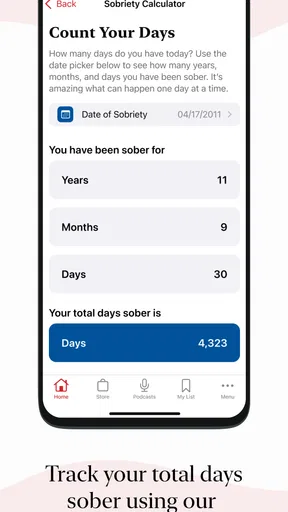
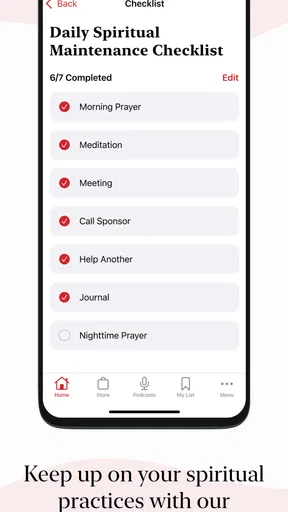
That focus also helps set expectations. I wouldn’t install it as a replacement for a meeting, a sponsor, or personal support. I see it as a reading companion: a way to encounter other people’s perspectives and carry a reflective piece of writing into an ordinary part of the day. For a reader who wants that connection, the narrow scope feels purposeful. For someone looking for broad recovery tools or a general sobriety tracker, it may not be the right fit.
From a spare moment to a saved read
My most practical way to use it is to start with the time I have, rather than browse aimlessly. If I only have a short break, I can open the homepage, scan the available stories, and choose something that fits my attention. When a topic catches my eye but I need to leave, bookmarking gives me a simple handoff from “interesting now” to “read when I can focus.” That small habit is useful because it avoids treating every article as something I must finish immediately.
Search can help when I have a particular theme in mind. I’d use a keyword to narrow the reading instead of scrolling through everything, especially if I’m trying to find a piece to revisit or share in conversation. A practical tip is to keep search terms broad at first, then refine them if the results feel too wide; the goal is to find a useful starting point, not to turn browsing into research homework.
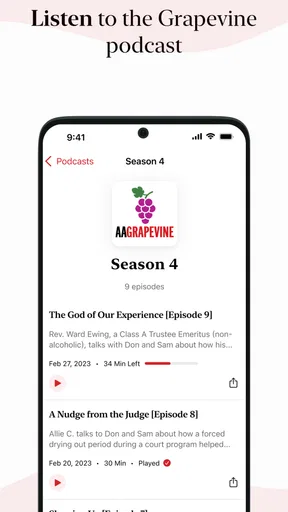
Audio gives the app another role in that routine. If I’m walking or doing a task that doesn’t leave my hands free, listening can be easier than trying to read on a moving phone. I’d choose audio when I can pay attention safely and comfortably, and save text for moments when I want to pause, reread a passage, or take in a personal story at my own pace. The two formats serve different situations rather than making one universally better.
Sharing without making it a substitute for conversation
The share option creates a useful handoff from the app to another person. If a piece makes me think of a friend or fellow member, I can pass it along as a prompt for conversation. I’d be selective, though: sharing an article is not the same as knowing what someone needs to hear, and personal material can land differently depending on the moment. The strongest use is often simple—send something relevant, then let the other person decide whether they want to read it.
Worth Reading Before You Choose

Flipboard Shows What News Apps Must Do Beyond the Feed

Switching to Android Auto Means Rethinking Your Driving Routine

Google Calendar Makes a Crowded Week Easier to Manage

Ludo King Makes the Most of the Minutes Between Plans

Baby Panda World Brings Quick Play to Modern Phones, but Its Game Library Feels Busy

ESPN’s Live Game View Makes Following Close Games Easier
This also makes the app handy for someone who already discusses Grapevine writing with others. A saved article can give me a concrete starting point for a later conversation, while audio may suit a shared listening moment better than handing around a phone. Neither replaces a meeting or face-to-face support; they just make it easier to bring a reading into those connections when it feels appropriate.
Access, cost, and who should choose it
The app is free to install, and the listed in-app purchases range from $2.99 to $29.99 per item. That spread means I would explore what is available before deciding whether to spend, rather than assume every article or feature requires payment. If I’m an occasional reader, I can judge the experience by the free material first. If I return often and value the publication’s content, a paid option may make more sense, but I’d weigh that against how regularly I actually read.
It is published by Grapevine and La Viña Apps, has an Everyone content rating, and is in the News & Magazines category. It has a 4.4 average from around 130 ratings and over 10,000 installs. The current version is 1.21.0, and it requires Android 9 or later. Those details make it straightforward to check basic fit: Android users should confirm their device meets that requirement, while anyone considering a purchase should review the in-app choices on their own device before committing.
Where the routine can snag
A focused reading app inevitably has a smaller role than a general magazine platform. If I want breaking news, a wide range of publishers, or a place to organize books and long-form journalism from many sources, I’d use a different tool. This app is most worthwhile when Grapevine itself is what I came to read. That also means its usefulness depends on whether the available material matches my interests and how often I want to return to it.
There are a few practical frictions to consider. Paid content can interrupt a reading session if I reach an item that requires a purchase, so I’d avoid assuming that everything I see is included at no cost. And if I prefer extensive display controls, such as choosing a font size or dark appearance, those would be sensible things to check in the app before settling into a long reading session. I don’t want a small-screen comfort issue to turn a promising article into work.
My everyday test would be a quiet commute as a passenger or a break between errands: search for a theme, save a piece that needs more attention, then listen to an article during a walk when it is safe to do so. That sequence gives each tool a job and prevents me from trying to read while distracted. If I only want quick headlines or entertainment, I’d skip this routine; if I want reflective AA Grapevine writing in formats that can fit around the day, it is a more tailored option.
Hey there! So, I recently got my hands on the AA Grapevine app, and let me tell you, it’s quite the digital companion for anyone involved in the Alcoholics Anonymous community. If you’re looking for an app that brings the rich content of the AA Grapevine magazine straight to your device, this might just be what you need.
First Impressions
As soon as I opened the app, I noticed how clean and intuitive the interface is. You know how some apps can be a little too flashy or overwhelming? Not this one. It’s straightforward, which is exactly what you want when you’re trying to focus on meaningful content.
The homepage welcomes you with a variety of articles that, honestly, are just a tap away. The app's design makes it easy to navigate through the latest stories, personal reflections, and even some of those classic AA Grapevine gems that long-time readers will appreciate.
Content Galore
Now, let’s talk content. The app offers a treasure trove of articles. Whether you're in the mood for personal stories, thoughtful essays, or even some humorous takes on the journey of sobriety, it’s all there. I really appreciated the diversity of voices and experiences shared in the app. It’s like having a meeting right in your pocket.
One cool feature is the audio section. For those times when reading isn’t an option, you can listen to articles being read aloud. It’s perfect for those long commutes or when you're out for a walk and want something inspiring to listen to.
Features That Stand Out
Alright, let’s dive into some of the standout features. The search function is super handy. You can look up articles by keywords, which is great if there's a specific topic you want to explore. Plus, the bookmarking feature lets you save articles to read later – a lifesaver for someone like me who tends to get sidetracked easily.
Another thing I noticed is the app's ability to share content. Found something inspiring? You can easily share articles with friends or fellow members, making it a great tool for fostering connection and discussion.
Room for Improvement?
Now, every app has its quirks, right? While the app is pretty solid, I did find myself wishing for a bit more customization. For instance, the ability to adjust font sizes or switch to a dark mode would be a nice touch. But hey, these are minor tweaks in the grand scheme of things.
Another thing to keep in mind is the subscription model. While there’s a good amount of free content, some articles are locked behind a paywall. If you’re a regular reader, it might be worth the investment, but it’s something to consider if you’re on a tight budget.
Final Thoughts
Wrapping it up, the app is a valuable resource for anyone involved in Alcoholics Anonymous. It brings the heart and soul of the Grapevine magazine into a convenient digital format. Whether you’re a long-time reader or new to the community, this app offers a handy way to stay connected and inspired.
So, if you haven’t already, give it a download and see if it resonates with you. It might just become your go-to app for those moments when you need a little extra motivation or a reminder that you’re not alone on this journey.
Pros
- User-friendly interface for easy navigation.
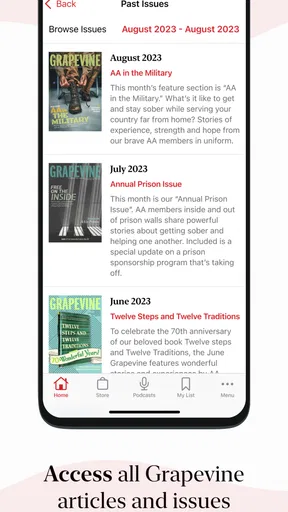
- Extensive archive of past issues available.
- Audio features for on-the-go listening.
- Regular updates with fresh content.
- Supports offline reading for convenience.
Cons
- Requires subscription for full access.
- No interactive community features.
- Limited customization of reading settings.
- Occasional bugs in the audio player.
- No dark mode for nighttime reading.
FAQs for AA Grapevine
What is the main purpose of the AA Grapevine app?
The AA Grapevine app serves as a portable extension of the AA Grapevine magazine, providing users with access to a wealth of articles, personal stories, and recovery resources. It aims to support individuals in their journey of recovery from alcoholism by offering inspirational content and connecting them with a supportive community.
Is the AA Grapevine app free to use?
The app is free to download, but access to its full content requires a subscription. Users can enjoy a selection of free articles and stories, but subscribing unlocks the complete library, including archived issues and exclusive audio content. Subscription options are typically offered on a monthly or annual basis.
Can I access the AA Grapevine app offline?
Yes, the AA Grapevine app offers offline access to content. Users can download articles and stories to their devices, enabling them to read or listen to materials without an internet connection. This feature is particularly useful for those who want to access content while traveling or in areas with limited connectivity.
What types of content are available on the AA Grapevine app?
The app provides a diverse range of content, including personal stories of recovery, inspirational articles, interviews, and audio content. Users can also access archived issues of the AA Grapevine magazine, allowing them to delve into a rich history of recovery experiences and insights shared by members.
Is the AA Grapevine app available on both Android and iOS?
Yes, the AA Grapevine app is available for download on both Android and iOS platforms. Users can find it in the Google Play Store for Android devices and the Apple App Store for iOS devices, ensuring accessibility across a wide range of smartphones and tablets.


